mirror of
https://github.com/andatoshiki/toshiki-notebook.git
synced 2026-06-06 09:16:45 +00:00

90 lines
4.5 KiB
Markdown
90 lines
4.5 KiB
Markdown
# CIS105: Computer Applications & Information Systems Lect. 3
|
|
|
|
## Chapter 3: Computer Hardware
|
|
|
|
### 3.1: Technical Terminologies
|
|
|
|
- **System Unit**: Main body of the computer that contains a motherboard.
|
|
- **Motherboard** (AKA Circuit Board): Main component of a system unit; a compleex array of electronics that connect and help different components of the computer communicate with each other.
|
|
- PC: Motherboards, Mac; Logic Boards
|
|
- **Chassis** (AKA Case or Box): Case to enclose the main components of a computer
|
|
- **Microprocessor**: The brains of the computer
|
|
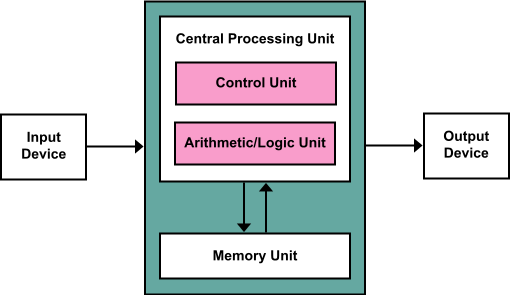
- **Central processing unit (CPU)**: Interprets program instructions and processes data by performing arithmetic and logical operations.
|
|
|
|
### 3.2: Central Processing Unit (CPU)
|
|
|
|
- Speed is directly, but not solely, related to the CPU
|
|
- Measured in Clock Rate
|
|
- The number of cycles per second, that a computer can perform its most basic task
|
|
- RSIC (Reduced Instruction Set Computer): Many chips encased into one chip
|
|
- Bus Lines; Pathways that transfer data and power between components inside of a computer.
|
|
|
|
| Architecture Diagram of CPU | Actual CPU Image |
|
|
| ------------------------------------------------------------ | ------------------------------------------------------------ |
|
|
|  |  |
|
|
|
|
### 3.3 Power Supply Unit (PSU)
|
|
|
|
- Supplies electricity
|
|
- Converts 100-120 volts or 220-240 volts of **alternating current (AC)** to a lower voltage direct current (DC) that can be used by the internal components of the system unit
|
|
- Different currents used in different parts of the world.
|
|
|
|
### 3.4: Primary and Secondary Storage
|
|
|
|
- **Primary**: The workbench
|
|
- Random Access Memory (RAM): Primary storage
|
|
- **Secondary**: The storage for all your tools and supplies
|
|
- Hard Drive: Secondary storage
|
|
- ROM Chips (Read-Only Memory): Preprogrammed chips that serve specialized internal tasks. No human intervention
|
|
- AKA Firmware
|
|
|
|
#### 3.4.1: Secondary Storage Contd.
|
|
|
|
- Internal vs. External Storage
|
|
- Hard Drivers vs. Solid State Drivers (SSDs)
|
|
- Impractical for a computer to be stand-alone
|
|
- Important to consider business needs
|
|
- Bad IT can make or break a business
|
|
|
|
### 3.5: Binary Number System
|
|
|
|
- Computer only understands one language: Machine code or machine language
|
|
|
|
- 1 or 0 (on or off)
|
|
|
|
- 1s or 0s are referred to as bits (short for binary digits)
|
|
|
|
- 8 bits become a byte
|
|
|
|
- Byte 8 bits
|
|
- Kilob
|
|
|
|
- American Standard Code for Information Interchange (ASCII): The coding scheme that most microcomputer use to represent bytes.
|
|
|
|
- | Name | Equal To | Size (In Bytes) |
|
|
| --------- | ----------------- | ----------------------------------------- |
|
|
| Bit | 1 Bit | 1/8 |
|
|
| Nibble | 4 Bits | 1/2 (rare) |
|
|
| Byte | 8 Bits | 1 |
|
|
| Kilobyte | 1024 Bytes | 1024 |
|
|
| Megabyte | 1, 024 Kilobytes | 1, 048, 576 |
|
|
| Gigabyte | 1, 024 Megabytes | 1, 073, 741, 824 |
|
|
| Terrabyte | 1, 024 Gigabytes | 1, 099, 511, 627, 776 |
|
|
| Petabyte | 1, 024 Terabytes | 1, 125, 899, 906, 842, 624 |
|
|
| Exabyte | 1, 024 Petabytes | 1, 152, 921, 504, 606, 846, 976 |
|
|
| Zettabyte | 1, 024 Exabytes | 1, 180, 591, 620, 717, 411, 303, 424 |
|
|
| Yottabyte | 1, 024 Zettabytes | 1, 208, 925, 819, 614, 629, 174, 706, 176 |
|
|
|
|
### 3.6: Peripheral Devices
|
|
|
|
- Input v. Output
|
|
- Input device: keywords, mice, touchpad, stylus, speakers, microphone, digital camera, etc/
|
|
- Optical Character Recognition (OCR): Converting printed text to digital text
|
|
- Radio Frequency Identification (RFID): An input mechanism that can be used to label a product for identification and have the product's information transmitted through radio waves.
|
|
|
|
### 3.7: Output Devices Contd.
|
|
|
|
- Monitor: A series of transistors that translate machine code into text and images./
|
|
- Pixels: A single dot on a graphic or text image
|
|
- Resolution: The number of pixels inside a defined dimension on a monitor, commonly referred to as **dots per inch (dpi).**
|
|
- Resolution is the most important feature of a monitor. |